
Monitoring Customer Interactions
If a customer requests an extension or an early return, it’s reflected in that rental’s details and activity history as it moves through its workflow. For extensions specifically:
- You can create an extension request yourself for an eligible active rental.
- If a customer requests an extension that involves your shop as payer, you’ll receive that request and decide the payer stage before it moves forward.
Request Extension
If a rental needs more time, extensions run through a clear approval chain involving your shop, the customer, and the car owner. Here’s how it works.
How to request an extension
You can create an extension request yourself for an eligible active rental, choosing from the approved extension durations (the standard options are 7, 14, 21, or 28 days). Before submission, the system checks that the vehicle is actually available for the proposed extended dates.
Only one active extension request is allowed per rental at a time — you won’t be able to create a duplicate request while one is already in progress.
If your customer is the one who initiates the request instead, it enters Pending Shop Owner Approval and you’ll be notified to make the payer decision described below.
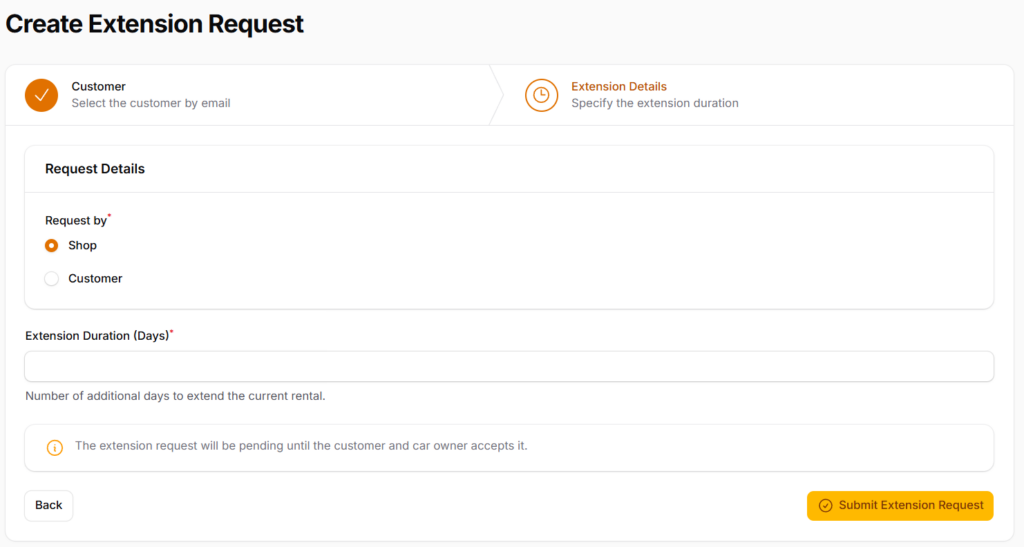
Understanding who pays for the extension
When an extension comes from the customer, you decide whether your shop covers the cost:
- If you (the Shop) accept responsibility — Your shop is designated as the payer for the extension.
- If you decline — The customer is then asked to accept or reject payment responsibility themselves.
- If the customer rejects, or doesn’t respond within the configured window after your decline — The extension is automatically cancelled.
Once a payer is determined, the request moves on to the Car Owner for their approval — they have a configured window to accept or reject it, and no response by the deadline results in an automatic rejection/expiry.
Tracking extension request status
You can follow an extension’s progress from the rental’s details at every stage: pending your decision, pending customer decision (if you declined), pending Car Owner approval, approved, rejected, or expired.
If the Car Owner rejects or lets the request expire, the rental’s original end date and the vehicle’s state stay unchanged, and RNTLS operations is notified for any necessary follow-up — so you’ll always know where an extension stands and what happens next if it doesn’t go through.
Vehicle Early return
work differently — this is a customer-initiated action, not something you or the Car Owner need to approve:
- The customer can trigger an Early Return only within the configured eligibility window before their scheduled return, and only for a date/time earlier than their current return date.
- Only one Early Return can be submitted per rental — a customer can’t submit it more than once for the same rental schedule.
- Once submitted, the rental proceeds through the standard return and inspection process, just on the earlier timeline.
- Billing is recalculated for the days actually used, and any unused prepaid rent or RAP is refunded or credited.
- If the early return follows an accident, it’s handled differently: the rental closes as accident-related, the vehicle moves to Under Maintenance, and the security hold stays pending until RNTLS Administration makes a fault decision — rather than releasing automatically.
You’ll see which path a given rental took (standard return, early return, or accident-related early return) directly in its status and activity history.
Accidents or Incidents report
If a customer reports an accident or another incident during one of your shop’s rentals, here’s exactly what that means for you, for the rental, and for any replacement that follows.
Your role includes incident/replacement visibility, so you can view what’s happening — but the incident itself is handled directly between the Customer, the Car Owner, and RNTLS Administration. You won’t be asked to make a fault or replacement decision yourself; your job is to stay informed and follow along, since it’s still your customer.
- The rental is flagged as incident-affected in your rentals list.
- Opening the rental shows you the incident’s evidence and current status as it progresses.
- You’ll see the eventual outcome — fault decision, compensation, and how the rental resolves — reflected in that rental’s activity history.
What happens to the rental
- If the vehicle is drivable, the customer can continue the rental, request a replacement, or return the vehicle.
- If the vehicle isn’t drivable, the customer can only request a replacement or return the vehicle — it’s no longer usable as an active drive.
- If there’s a pending extension on the rental when the accident is reported, that extension is automatically rejected (no extension payment is captured) — the accident takes priority.
- Fault and any compensation decision are made only by RNTLS Administration, based on the submitted evidence. Refunds, holds, and payout implications for that rental aren’t finalized until that decision is recorded.
How a replacement is created
- A replacement isn’t something you create — it’s created by an authorized RNTLS Administrator, using the original customer and request criteria plus a new eligible vehicle, for the remaining rental period.
- The replacement record stays linked back to your original rental and its incident, so you can always trace the full story from either record.
- The customer goes through the normal confirmation process again for the new vehicle before the replacement rental starts.
- Once created, the replacement is visible to you in your replacement list and detail views, the same way your regular rentals are.